
In today’s fast-moving world, people need better ways to think, plan, and remember information. A mind map is one of the simplest and most powerful tools for this. If you are learning how to create a mind map, you are already moving toward better thinking and better organization.
A mind map helps you take a big idea and break it into smaller, easy parts. It works like your brain naturally works—through connections, not straight lines. Students, professionals, business owners, and even teachers in the US use mind maps every day to save time and think clearly.
This guide will explain everything in very simple English. You will learn step-by-step methods, digital tools, Microsoft Word and PowerPoint techniques, and expert tips. By the end, you will fully understand how to create a mind map in both manual and digital ways.
WHAT IS A MIND MAP? SIMPLE EXPLANATION
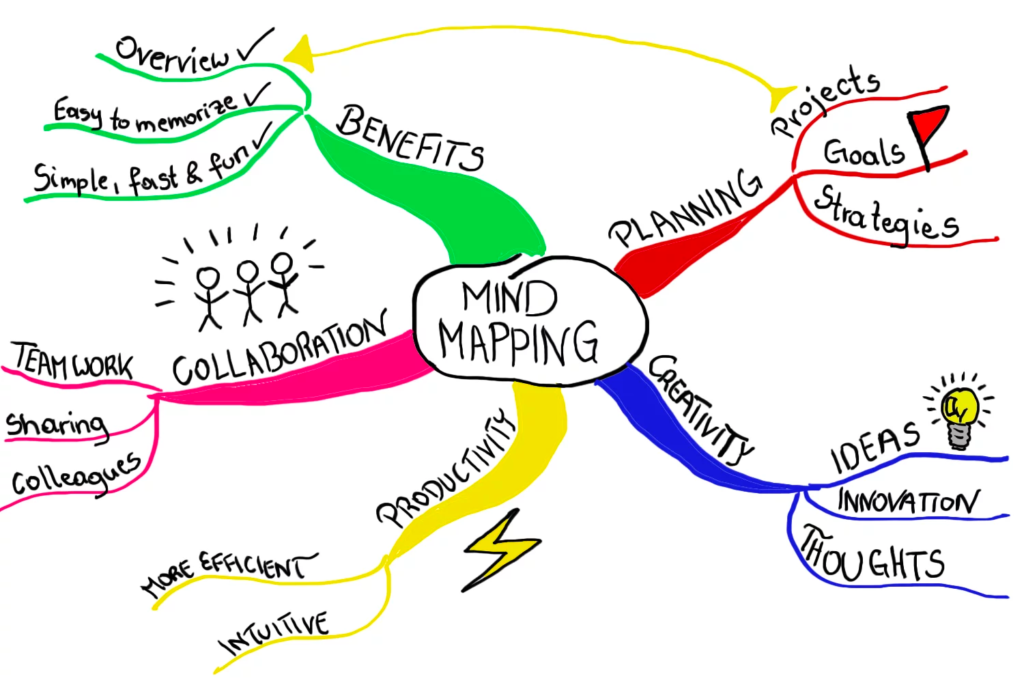
A mind map is a visual diagram that starts with one main idea in the center. From this center, branches grow outward. Each branch represents a sub-topic or idea.
For example, if your main topic is “Healthy Living,” branches could be:
- Exercise
- Diet
- Sleep
- Mental Health
Each of these can further break into smaller ideas.
The purpose of a mind map is to help your brain:
- Understand information faster
- Remember things easily
- Connect ideas naturally
Instead of long notes, you see a clear picture.
WHY LEARN HOW TO CREATE A MIND MAP IN 2026?
Modern learning and work environments demand fast thinking and clear communication. Mind mapping is useful because:
Also read:Messonde: Meaning, Purpose, Digital Impact, and Why It Matters Today
- It improves creativity
- It increases memory power
- It makes planning easier
- It reduces confusion
- It saves time in studying or meetings
In schools, students use mind maps for exams. In companies, teams use them for planning projects. Even freelancers use them for content ideas.
So learning how to create a mind map is not just a study skill—it is a life skill.
BASIC STRUCTURE OF A MIND MAP
A good mind map always follows a simple structure:
- Central Idea (Main Topic)
- Main Branches (Key Categories)
- Sub-Branches (Details)
- Keywords (Short words, not long sentences)
- Colors and Images (Optional but helpful)
This structure keeps your thoughts clean and organized.
STEP-BY-STEP GUIDE: HOW TO CREATE A MIND MAP MANUALLY
Let’s start with the simplest method—pen and paper.
Step 1: Write the Main Idea in the Center
Take a blank page. Write your topic in the middle. Circle it.
Step 2: Draw Main Branches
Draw lines from the center in different directions. Each line represents a main category.
Step 3: Add Sub-Branches
From each main branch, draw smaller lines for details.
Step 4: Use Keywords
Write only important words, not full sentences.
Step 5: Add Colors
Use different colors for each branch. This improves memory.
Step 6: Add Small Drawings (Optional)
Simple icons or symbols make your map more powerful.
This is the foundation of how to create a mind map without any digital tool.
HOW TO CREATE A MIND MAP IN WORD (MICROSOFT WORD METHOD)
Many people prefer using computers. If you want to know how to create a mind map in Word, follow these steps:
Step 1: Open Microsoft Word
Start a blank document.
Step 2: Insert SmartArt
Go to Insert → SmartArt → Choose “Hierarchy” or “Relationship” layout.
Step 3: Add Central Topic
Write your main idea in the center box.
Step 4: Add Branches
Click on shapes and add sub-topics.
Step 5: Customize Design
Change colors, shapes, and layout style.
Step 6: Save Your File
Keep it for future editing.
This method is simple for students and office workers. It is one of the most searched methods for how to create a mind map in word.
Also read:How Much Does Cybersecurity Cost? A Complete Guide for Businesses and Individuals
HOW TO CREATE A MIND MAP ON WORD (ALTERNATIVE METHOD)
Another way for how to create a mind map on Word is manual shape drawing:
Step 1: Open Word and go to Insert
Step 2: Click Shapes
Step 3: Draw a central circle
Step 4: Add lines and boxes manually
Step 5: Label each part
Step 6: Adjust colors and alignment
This method gives more creative freedom than SmartArt.
HOW TO CREATE A MIND MAP IN POWERPOINT (VISUAL METHOD)
PowerPoint is one of the best tools for visual mind mapping. If you want to learn how to create a mind map in PowerPoint, follow this process:
Step 1: Open PowerPoint
Start a blank slide.
Step 2: Insert Shapes
Use circles for central idea and lines for branches.
Step 3: Add Text Boxes
Label each idea clearly.
Step 4: Use Design Tools
Add colors, icons, and themes.
Step 5: Align Properly
Keep everything balanced for easy reading.
Step 6: Save or Present
You can use it for presentations or study notes.
PowerPoint is great for team meetings and business planning.
DIGITAL TOOLS FOR MIND MAPPING IN 2026
Besides Word and PowerPoint, many tools exist:
- XMind
- MindMeister
- Canva
- Miro
- FreeMind
These tools allow drag-and-drop features, templates, and cloud saving.
They are especially useful for professionals who want advanced mind maps.
ADVANTAGES OF DIGITAL MIND MAPPING
Digital tools make mind mapping even easier:
- Easy editing
- Cloud storage
- Collaboration with teams
- Faster design
- Export to PDF or image
This is why many users search for how to create a mind map using online tools.
COMMON MISTAKES PEOPLE MAKE WHILE CREATING MIND MAPS
Even simple tasks can go wrong. Avoid these mistakes:
- Writing full sentences instead of keywords
- Overcrowding branches
- Using too many colors
- No clear structure
- Forgetting central idea focus
A good mind map should always be clean and simple.
BEST PRACTICES FOR EFFECTIVE MIND MAPPING
To improve your skills, follow these expert tips:
- Start with a clear goal
- Keep ideas short
- Use images when possible
- Stick to one idea per branch
- Review and update your map
These habits make your mind maps more powerful and useful.
HOW STUDENTS CAN USE MIND MAPS FOR STUDYING
Students in the US and worldwide use mind maps for:
- Exam revision
- Essay planning
- Science topics
- History timelines
Instead of memorizing long notes, they visualize information. This improves understanding and recall.
HOW PROFESSIONALS USE MIND MAPS AT WORK
In business environments, mind maps are used for:
- Project planning
- Brainstorming ideas
- Meeting notes
- Marketing strategies
They help teams stay organized and aligned.
CREATIVE USES OF MIND MAPPING
Mind maps are not only for study or work. You can also use them for:
Also read:هنتاوي com: Complete Guide to the Arabic Anime News, Reviews, and Streaming Resource Platform
- Travel planning
- Life goals
- Habit tracking
- Book summaries
- Content creation ideas
This flexibility makes them extremely useful.
HOW TO IMPROVE YOUR MIND MAPPING SKILLS OVER TIME
Like any skill, practice is important. To improve:
- Create one mind map daily
- Try different tools
- Study examples online
- Experiment with layouts
Over time, your maps will become more professional.
ADVANCED TECHNIQUES IN MIND MAPPING
Once you master basics, try advanced ideas:
- Use icons for emotions
- Add flow arrows
- Combine multiple maps
- Use digital linking between topics
These techniques help in complex planning.

IMPORTANCE OF SIMPLICITY IN MIND MAPPING
The best mind maps are simple. If your map becomes too complex, it loses purpose. Always remember:
- One idea per branch
- Clear structure
- Easy reading
Simplicity improves understanding.
HOW TO CREATE A MIND MAP FOR LONG-TERM MEMORY
Mind maps are powerful for memory because they use visual thinking. To improve memory:
- Use colors for categories
- Add images
- Repeat review sessions
- Connect ideas logically
This helps your brain store information longer.
FUTURE OF MIND MAPPING IN DIGITAL WORLD
In 2026 and beyond, mind mapping is becoming smarter. AI tools now help users create maps automatically. Cloud platforms allow real-time collaboration. This shows that learning how to create a mind map is becoming more important than ever.
FAQS ABOUT HOW TO CREATE A MIND MAP
What is the easiest way to start a mind map?
Start with a central idea, then draw simple branches using keywords.
Can I create a mind map without software?
Yes, you can use paper and pen. It is one of the best beginner methods.
Is Microsoft Word good for mind mapping?
Yes, you can easily learn how to create a mind map in Word using SmartArt or shapes.
Can I use PowerPoint for mind maps?
Yes, learning how to create a mind map in PowerPoint is useful for presentations.
What is the difference between notes and mind maps?
Notes are linear, while mind maps are visual and connected.
Is mind mapping good for exams?
Yes, it helps improve memory and quick revision.
CONCLUSION: MASTERING HOW TO CREATE A MIND MAP
Learning how to create a mind map is one of the most valuable skills in education and professional life. It helps you think clearly, organize ideas, and improve memory.
Whether you use paper, Word, PowerPoint, or digital tools, the principle remains the same—start with a central idea and expand it in simple branches.
With regular practice, mind mapping becomes a natural habit. It improves productivity, creativity, and understanding in almost every area of life.